
Allegedly, the blackboard or chalkboard was invented by the Scotsman James Pillans (1778–1864) who according to his book Physical and Classical Geography (1854) taught Geography with it in Edinburgh.
Since 1801 George Baron is supposed to have used a blackboard in his maths lessons at West Point.
Although many schools have begun to replace blackboards with whiteboards, this 200 year old technology is still far from dying out…
When I was working in school, I came home everyday with the traces of my profession: chalk dust – on my sleeves and in my lungs.
The blackboard was my closest ally. It was the primary medium. It was a canvas for abstract visualizations, a message board, a playing field for the 3rd graders eagerly awaiting that five minutes of hang-man.
Over time, I developed a host of successive drawings for each grammatical issue and orthographic aberration, all filed in my brain and ready to be reproduced for new students at any given moment.
Going Digital
When I began to teach online, I experimented with various Virtual Classrooms.
Most of them came with a digital whiteboard and while they mostly served the purpose, I ditched the VCs for other reasons in my personal teaching practice.
Either they were overly complex, buggy or both. I didn’t want to waste time at the beginning of each session to explain new-comers how to get that annoying flash-based microphone input working, etc.
So, as I describe here, I went for something more pragmatic: Using Skype.
Everyone already has it installed. Everyone knows how to use it.
It comes with screen-sharing, which is great.
What about Whiteboards? There are tons of Skype add-ons but … surprise surprise… both parties need to have an add-on installed for it to do its magic.
Experience has shown that when push comes to shove, the Skype add-on system is too complicated and confusing and ultimately time-wasting if you just want to quickly jot down and/or visualize something.
So, as nice as the many third-party extensions may be, they have proven to be rather useless in practice.
What to do?
I’ve experimented with other java-based whiteboards but either they were buggy or incompatible with some devices.
Did I give up on visualizing in online teaching? Of course not.
For the most part, I have been using Google Docs Draw.
It’s HTML5, it’s stable and most of the time it just works. Voilá.
But there have been three things that I missed:
- there’s no free-hand drawing tool! (sometimes you just want to get in there and make some quick scrawls…)
- if you want to draw or add text on top of a worksheet or image, there’s no way to lock or fix the background layer. In practice that’s like trying to write on a super-slippery surface. Very annoying!
- Sometimes Google Docs asks people to log-in even when you got a doc set on “no login required” which makes it basically useless for people who don’t have a Google Account (yes, they do exist!)
Conceptboard: The Perfect Whiteboard?
Kay Alexander recently published a post on edukwest about the German start-up Conceptboard rolling out an integration for Google+.
This led me to look into the core of Conceptboard a bit deeper.
And it might just become a perfect alternative to Google Docs Drawing.
Its features are very simple and powerful and you can see almost all of them in the screenshot, below:
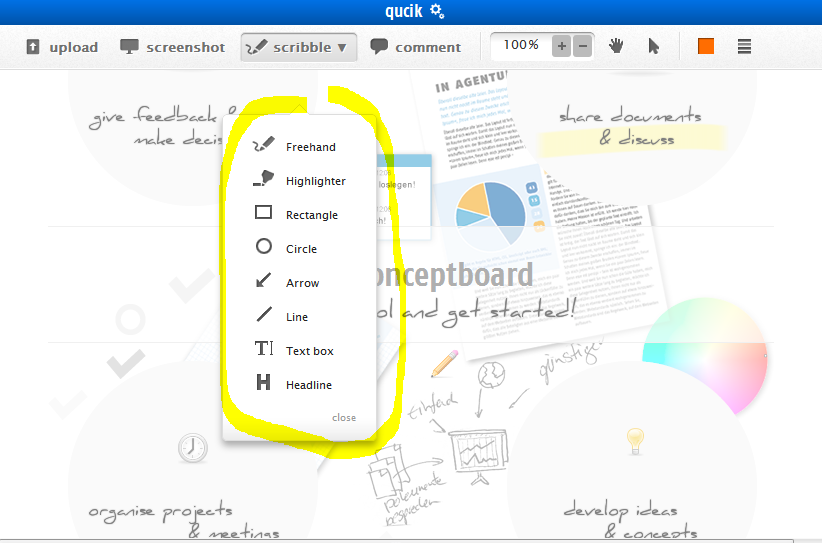
Here’s what’s interesting about Conceptboard from an Online Teaching perspective:
- the upload button allows to integrate drawings and whole PDFs with many pages that then can be drawn, scribbled or written upon without the danger of having these background layers slip and slide.
- to invite participants, just copy the URL and share them with students and collaborators: There is no need to sign up or log-in for them. Conceptboard asks participants to pick a name they want to be identified with on the board but that’s it.
- Presenter-Mode: Have people follow your cursor across the board and focus what you focus on.
An important factor of these online tools is simplicity, stability and velocity.
So far, Conceptboard has passed all my tests. With the help of a quick Chrome app you can create a new board and share it within 2 to 3 clicks from the get-go. So, within just a few seconds everyone is on the same map.
It remains to be seen over time whether Conceptboard is robust enough to weather all the different scenarios of online teaching. I’m especially looking forward to use it in lessons with my younger students.
If it doesn’t break then, then it’s really stable!
UPDATE:
I did test it with the kids in the meantime and they have become its biggest fans, we use it almost in every lesson to fill in worksheets, solve riddles and more. Also, sometimes when they want to explain something but lack the word, I invite them to draw what they mean. They even manage to produce almost flawless handwriting with a mouse, something that most adults shy away from. In any case, Conceptboard is the most stable whiteboard I have ever seen. In just a few seconds a new board can be created, the URL shared through the Skype chat and the visualizing begins!
–
img: Some rights reserved by kharied